Friday, December 5, 2008
Want more blog traffic? Try Image Search Optimization
44 comments Posted by Contrariwise at 12:01 AM Google Image Searches can bring as much or more traffic to your site as all other search engines combined. I did a little analysis of my blog for inbound searches recently and found that well over half of my inbound searches have come from Google Image Searches!
Three of the most important things that Google Image Search looks for, in descending order, are:
1. Alt Text
2. File Name
3. Surrounding Text
1. Alt Text
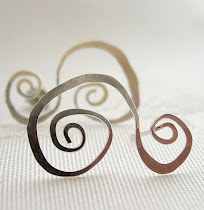
See the earrings above? In Blogger, in Compose mode all you see is the image. But if you click on the Edit Html tab, you will see the following html language:
Notice the alt="" that I highlighted in yellow?
The Alt Text (the part between the quotation marks) can contain keywords describing an image - BUT ONLY IF YOU ADD THEM. Alt Text is the text equivalent for an image, and is used by blind people (and also for other things).
But, importantly, Google uses Alt Text to find images. It's the MOST IMPORTANT element of Image Search Optimization.
How can you add it? Just by putting a description between the quotation marks.
I'll show you how. For this example, let's add the words "sterling silver hoop earrings swirls":
 Remember, try to be descriptive with your Alt Text, but don't over do it. The best thing to put here are keywords you personally would search for if you were looking for that image.
2. File Name
Instead of calling your photo file image1234.jpg, rename it to something more descriptive such as sterling-silver-earrings-with-swirls.jpg. Try to keep the File Name either the same, or very similar to the Alt Text. The name of the file for my earrings is silver-hoop-earrings-with-swirls.jpg. The html Image Name for the image is: Google will use the Image Name as it searches for images.
3. Surrounding Text
Always try and place a paragraph of descriptive text directly above and below your image, with words from your Alt Text and Image Name included in this text.
Google will look for relevance. If it doesn't think your Alt Text and Image Name correspond with your surrounding text, it might ignore your image.
It may take a while for google to crawl through the web and find your site, but you' ll be AMAZED at how many more hits your blog will have if you remember these 3 steps.
Do you want to subscribe to my blog by email? Click here!.
Would you like to be a Contrariwise follower? (I love having more friends!) All you have to do is click on the link in the upper right on my side bar.
Monday, November 24, 2008
 Did you ever click on an image in a blog to get a better look? I know I have. Sometimes nothing happens. But sometimes the click takes you to a larger version.
But did you know that you can link your image to a webpage? So that when you click on the image you get transported to who-knows-where?
For example. Click on the photo on the right. Where does it take you?
Yes, I've just shamelessly used the photo as a marketing tool.
How do you do this on blogger? It's easy.
Click on the icon that allows you to insert an image. That should bring up a familiar screen where you choose your image and layout. Place your image where you want it in your post.
Then, in the Compose tab, click on the photo once to select it. Then click on the link tool.
Insert the address and...Voila! Your image is linked!
As you saw, I linked the image directly to my Etsy shop. You can link the photo to a corresponding item in your shop (which I've done before and could directly attribute more views to it from my post). But if your item sells, then you have to remember to update your link.
Do you want to subscribe to my blog by email? Click here!.
Would you like to be a Contrariwise follower? (I love having more friends!) All you have to do is click on the link in the upper right on my side bar.
Wednesday, November 5, 2008
Part 2. Blogger Following to increase traffic to your blog
4 comments Posted by Contrariwise at 12:01 AMPart 1 of this series discussed adding a feedreader to promote your blog. Today, the topic is Blog Following.
Recently Blogger added a new feature that allows you to subscribe to other blogs that you find interesting. It's called the Blogger Following feature. You can easily browse the blogs you follow as well as the blogs that follow you, see their posts, and check out the blogs they’re following.
So, ultimately, this is a great way for all of us to promote each other’s blogs.
Adding a follower widget in your sidebar makes it easy for others to follow your blog! And it's so easy.
How to add a follower widget
(1) Login to your Blogger Account
(2) Go to your Layout Page Elements tab
(3) Click “Add a Gadget”
(4) Select “Followers” from the gadgets list.
(5) Save
The Follower Widget will now be in your sidebar. It shows the profile pictures of your followers and gives your readers a “Follow This Blog” link to join up, too.

With a click on the followers icons, you can read their profiles, scope their blogs and posts, and check out the other blogs they’re following. (What fun! )
Plus, the new posts of the blogs you follow will pop up on your reading list in your dashboard. It's an easy way to keep track of a favorite blog and not miss any new posts.
How to follow a blog that has no Follower Widget
If you find a blog you like and want to follow it, but they don't have a Follower Widget in the sidebar, you can still follow it. Here's what you need to do:
At the dashboard you are given the ability to follow other blogs, even if they’re not hosted at blogger.com:
(1) Login to your Blogger Account.
(2) On the Dashboard under the Reading List section, click on ADD Button.
(3) Enter the URL of the blog you would like to follow and choose NEXT. If the blog you just followed is hosted at blogger.com your avatar will be included in that blog’s followers list.
(4) Choose whether you would like to follow publicly or anonymously.
(5) Now the newly added blog will be seen on your Dashboard's Reading List.
Do you want to subscribe to my blog by email? Click here!.
Would you like to be a Contrariwise follower? Then please click on the link in the upper right on my side bar.
Contrariwise Jewelry is now a proud member of Metalsmiths in Action: http://metalsmithsinaction.webs.com/index.htm
Monday, November 3, 2008
How to increase the number of people who read your blog. Part 1
7 comments Posted by Contrariwise at 12:01 AMIf you publish a blog, you publish a feed. A feed is the format that allows your content to be delivered (and subscribed to) on the Web.
Your feed can be picked up and displayed on other web sites and search engines.
Special software called feed readers can scan your site feed, and automatically let your readers and search engines know when your blog has been updated.
Importantly, having a feedreader will help your blog get into search engines and increase the number of people who see your blog!
The feedreader I use is Feedburner. Feedburner allows you to place an rss image of your blog so your readers can easily subscribe to your blog content. FeedBurner also offers a way for your readers to subscribe by email so everytime you post, an email will automatically get sent to them.
Step #1 - Setup a FeedBurner Account
Create your free account on Feedburner and input your blog url. (That's your address.)
( Mine is http://www.akacontrariwise.blogspot.com/ )
Step #2 - Point Your Blogger Feed to FeedBurner
Input the information they request; the name of your feed, the address etc etc.
(Hint: something I always forget is my feed address. It's:
"http: // feeds.feedburner.com/" followed by your feed name
(For example, mine is http://feeds.feedburner.com/akacontrariwise )
Step #4 - Promote Your FeedBurner Feed on Your Blog
This is very important.
Switch to your FeedBurner account and click on the “Publicize” tab. Then on the left side find and click on “chicklet chooser” and select one of the icons which will end up on your blog.
 Then scroll down to the bottom of the page and click on the drop-down. You’ll want to select “Blogger” to add the chicklet as a widget to your blog.
After you click the “Go!” button, Blogger will open in a new window and you’ll need to follow the prompts to continue to add the new widget.
Once you click on “Add Widget”, it will take you to your Blogger page elements layout where you can arrange the new FeedBurner widget. Save your layout and you’re done! You should now have a cool-looking rss feed icon on your blog where anyone can easily subscribe to your blog. Remember to login to FeedBurner often to check out your stats. You can accurately see the number of subscribers and also get a good idea of what people are reading. It helps you decide the types of things to write about in the future!
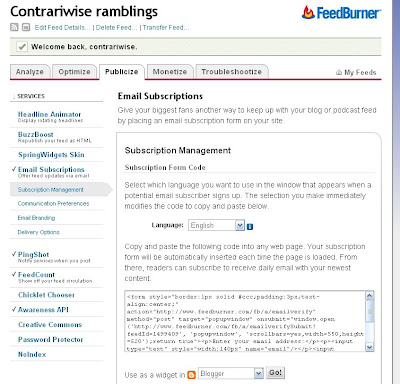
I love this one. This gives your readers the option to subscribe via email as well. Not everyone uses rss and email is much more familiar to everyone so why not give them both options.
Now you should be set!
I will be posting more blogging tips to increase your readership in the next several days.
Do you want to subscribe to my blog by email? Click here!.
Would you like to be a Contrariwise follower? Then please click on the link in the upper right on my side bar.
Contrariwise Jewelry is now a proud member of Metalsmiths in Action: http://metalsmithsinaction.webs.com/index.htm
Thursday, April 24, 2008
 Recently I've been hearing about the Million Blog list. This is an experiment to see how long it will take to get 1,000,000 blogs to list themselves.
They started on April 10th and currently only about 1000 blogs have registered. (Based on this, at the rate that blog addresses are being added, it will take 50 years to get to a million!)
I added myself yesterday and I'm number 973!
It is a little confusing on how to post your blog with a number, so you might want to follow these instructions.
Go to the Million Blog List.
The blog listings are in groups of 100.
Go to the section with the last entry. Click on the word "edit" click on the top of the section and it will take you to a screen that shows HTML code.
You will need to use html code to fill in the next line with your info.
To help you with filling the info in, I took a screenshot of my entry circled in red, below.
Here's exactly what I typed in:
You just need use the same html code to type in your information:
- the next number in the queue
- your wesite address
- the name of your site,
- and what it's about
Then you add their widget to your blog stating what number you are on the list!
(If you'd be interesting in subscribing to my blog and receiving it by e-mail, just click Subscribe to Contrariwise ramblings by Email.)
Friday, March 7, 2008
In this post I am only going to write about promotions I've tried (and tell you whether they seemed to work for me).
1. Business cards (5 Stars)
Get business cards made up – and hand them out to whomever you can– friends, family, co-workers, whoever. (I've actually had former customers ask me for large quantities, so that they can hand them when they get a compliment on the jewelry they bought from me.)
Add your cards and fliers to bulletin boards you have permission to use. When you ship an item sold at your Etsy shop, don't forget to slip in a couple business cards. (One for your customer, and one to hand out!)
2. Flickr account. (5 Stars)
Of anything I've done on the web, this has brought me the most sales. My tips:
- Don't forget to add your Etsy site to your profile. (Remember, you're not allowed to include it in the description in the photo. They will suspend your flickr account if you do!)
- Join a lot of groups and, every time you add a new picture to Flickr, make sure it's sent to all the relevent groups.
- Don't post a lot of photos to Flickr at once. My strategy is similar to my Etsy listing stratgey: space them out to give me the most exposure in the groups.
- Make friends. You get to see what other people post and they see what you post. Plus people surfing Flickr like to check on other people's friend lists - and you can be seen that way, too.
3. Blogging (2 Stars)
A lot of people swear that blogging is a great promotional tool and claim steady sales from their blog. My personal experience is that I have not had a single sale due to blogging. (I keep track of my stats on FeedBurner and have found that get very few clickouts to my Etsy site. In fact, while there have been over 30,000 hits on my blog, I think I've had less than 10 clickouts to my online shop! )
But you may have a different experience. If you blog or plan to blog, read all you can about increasing traffic to your site - you can't promote unless you have visitors!
Here's a great site that has strategies for using your blog for promotion: Tips for New Bloggers.
I also wrote a post about increasing traffic to your blog.
4 Deviant Art (2 Stars)
This is very similar to Flickr but I think that the people who use it are younger and artsier. I would recommend it to photographers and artists.
I have an account and regularly submit photos. Unlike Flickr, you can add a link to your Etsy shop within the description of each photo. I've found that I get a lot of views, comments, and clickouts to my Etsy shop. (I am not aware of any sales generated from this site.)
5. Squidoo. (1/2 Star)
Squidoo is a network of user-generated "lenses" --single pages that highlight one person's point of view, recommendations, or expertise. Lenses aren't primarily intended to hold content; more emphasis is placed on recommending and then pointing to content on the web, therefore they are great at pointing people to your website.
You can create a sections with photos directly linking to Flickr, links to your Etsy site, your blog etc.
I like the fact that it provides great stats on number of visitors and clickouts. I've gotten quite a few clickouts to my online shop. Since you join groups (many of which are devoted to shopping), you can get exposure to the right customers.
My gut feeling is that you need to spend a lot of time on Squidoo to get yourself seen and generate sales. So other than setting up my own lens and joining some groups, I've pretty much given up on Squidoo.
6. Craigslist (2 Stars)
This is like an internet classified ad. I've listed a few times and have correlated the listings with increased people viewing my online shop and a couple of inquiries. I'm going to try to advertise some more on it before I give up.
7. MySpace (??? Stars)
I have heard that you can get a lot of traffic to your site through MySpace - but you must have a lot of friends and join groups. Lots of people swear that they get lots of sales through MySpace. Problem: you need to invest a lot of time to create the site, update it, and make friends.
There's a great thread on Etsy about using MySpace as a marketing tool.
I have a MySpace account, but have not used it after I set it up. (OK, I confess, my son set it up for me.) If you want add me as a friend on MySpace I would appreciate it. It would force me to get more involved in it.
Once again, there are TONS more ways to promote outside of Etsy and the above is only my firsthand experience. Unfortunately, you could end up spending all your time promoting and less and less time creating. It's definitely a balancing act. So my last piece of advice is:
Track where your sales come from so you can focus your energies where they're most effective.
If you'd be interesting in subscribing to my blog and receiving it by e-mail, just click Subscribe to Contrariwise ramblings by Email.
Thursday, February 21, 2008
Blogger only gives you 3 choices for the size of the photos you post. Sometimes I've found that I wanted to post a larger or a smaller picture. It took me a while to figure out how to do this but after some googling, I finally figured it out.
1) First, your pictures have to be on an outside hosting site, not on your computer. For this example, I am using flickr .
2) Go to the picture you want in flickr. On the lower right, click on the option "See different sizes"
The size options include square, thumbnail, small medium, and original.
3) Click on the size you want. To link that size photo on your blog, you need to copy the html code found at the bottom of the flickr page.
4) Copy the html code that those sites give you and paste it where you want it to appear in your blog post. VERY IMPORTANT: You must use the Edit Html tab not the Compose tab.
Voila!
Here are examples of photos I linked to from my flickr account.
75x75 square:

Thumbnail size (100 x 97):
Small size (240x233):
Medium size (500x486):
Original size (700x68)
(If you don't like the standard sizes given by flickr, you can resize the photo to whatever you want first, by either using the editing program within Flickr, or resizing it in your photoediting program before uploading it to flickr.)
You can easily center the pictures by clicking on the photo (in the Compose view) and clicking on the Justify Center option.
Thursday, February 14, 2008
There's no secret to blogging or having ideas to blog about. Here are a few hints to save you time and get you organized
1. Take a notebook or binder with you wherever you go.
Sometimes during the day a great idea pops into your head for an excellent article topic, but you have no way of remembering it and soon that idea is lost. So you never forget any ideas, keep a notebook with you at all times. (That notebook is also great for jotting down ideas for your craft! I use mine to draw new jewelry designs when I get an inspiration!)
2. Have some backup posts ready for emergencies.
Whether you’re going to be away from your blog or the internet for a while, or whether a horrible case of writer’s block has plagued you, it’s always important to have some backup posts ready that you can publish without worry.
3. Create a weekly posting schedule. The only way to get people to visit your blog is to blog consistently.
For some bloggers it’s difficult to constantly have ideas for articles that need to be published the next day. Grab a piece of paper or your notebook, and make a chart that contains every single day of the week. Then think about which posts you’re going to publish on what days, and write it down. Jot down potential post titles and main points these articles might include. By planning ahead you can save several weekly hours of thinking and stressing over what you're going to write.
4. Subscribe to your favorite blogs in an RSS reader.
Subscribing to the blogs you read can keep you organized and save many hours each week. And if you like my blog,Contrariwise Ramblings, feel free to sign up! Just go my sidebar and enter your email address!
5. Quit checking your stats all the time.
Your blog will only go downhill if all you do is check your stats. (Same is true for Etsy and other sites you're on.)
6. Set aside a specific time of day to relax and blog.
This might be in the evening, when the kids are in bed and you're enjoing a nice cup of tea. Once you're organized, blogging won't be a chore; it'll be a time of day that you'll look forward to!
Monday, February 11, 2008
Submitting your url to search engines is supposed to increase traffic to your website. I found this list of Search Engines on Tips for New Bloggers. You may submit your site URL to these search engines for Free.
Google
Yahoo! Search
Microsoft Live Search
Alexa Web Search
Baidu (Chinese search engine)
ExactSeek
SearchSight
Scrub the Web
EntireWeb
Gigablast
Exalead
SearchKing
whatUseek
AnooX
Splat Search
Walhello
SearchIt
email Mozdex
Jayde
Infotiger
Abacho (European search engine)
Submit-one
TowerSearch
HotLaunch
Shoula
The-search-site
Websquash
Unasked
eVisum (educational resource)
DinoSearch
SearchRamp
SearchtheWeb
SearchWarp
Mixcat
BestYellow
Beamed
I've submitted Contrariwise Ramblings to most of these. I'll let you know if I see any more traffic. (But some of them claim that it might take WEEKS to add your website to their search engine!)